Week-1 is all about laying a strong foundation on building an Azure environment with Architect’s mindset, not simply read a step by step process, but with an understanding of why we do what we do. This learning is part of my journey toward Azure Solution Architect.
Below are the topics we are going to cover.
- Azure Subscription hygiene
- Azure Resource Group – not treating it as just a folder
- RBAC basics
- Identity and MFA
Azure subscription hygiene
Initially, when I started learning Azure, creating a pay as you go subscription simply felt like it’s just a first step I must do and I can jump to building an actual environment. But its just not that. We also need to setup cost management strategy which brought few questions to my mind.
- How much I can afford to spend for this learning each month?
- How would I prevent myself from overspending?
- Is there a way I can get alerts when I’m hitting the 50%, 75% and 90% of affordable cost?
That’s when budgeting comes into picture. In Azure portal you can do this and it’s a must for all the existing and new customers. This prevents you from unexpected surprise when the new bill is generated for the month.
Take away is Cost visibility must be designed early, otherwise cost governance becomes reactive and political. There should be a clear ownership and accountability of the resources that are created in Azure. Importantly, cost pain is not about money — it’s about explanation. How we can make sure of this is follows with Resource groups.
Azure Resource Group
As an AVD engineer, I always treated AZ resource groups as just a folder – naturally, as they simply had group of resources in them. And I was wrong. Probably many of us were.
I learned in this week that Resource groups are just not folders, they are more than that. RG defines lifecycle, ownership and RBAC boundaries.
How? Let me show you how.
Lifecycle
Resources that are created, changed, and deleted together should live together
For example, when you are creating a Host pool for an AVD environment, you will have session hosts for that HP. When you have all the related resources of those host pool such the session host VM, disks and NICs in the same RG, it will be easier to manage them and when the time comes to decommission that host pool or delete it for any reason, you can simply delete the whole RG at one shot. Easy right?..Indeed!
Imagine you also have security, monitoring and other network related resources which are unrelated to that host pool, then deletion becomes painful and brings confusion. That’s the point you hit with the sense of regret which can be easily avoided if the RG was made not treated as just a folder.
It’s also important to have naming convention, tags and proper RBAC scope.
NOTE: In the lab I created a Resource group named “rg-avd-prod” as it’s a lab setup I had only one region and one environment. So that the RG name is simple.
In actual customer production environment, it’s better to keep environment, region, department, tech-component, numbers. Ex: RG-AVD-EU-IT-Prod-001
RBAC and team boundaries
Creating and managing RGs separately by technical responsibilities.
Such as..
Network team –> Network related resource groups and has appropriate RBAC role
Monitoring team –> Monitoring related resource groups and has appropriate RBAC role
Security team –> Security related resource groups and has appropriate RBAC role
RBAC becomes simple and predictable when scope boundaries are clear. So you will not touch what you don’t supposed to touch.
Identity and MFA
I created a couple of users and groups. One is normal user, and one is an admin. Added the user to the group accordingly. I gave it Reader RBAC role for the RG I created earlier.
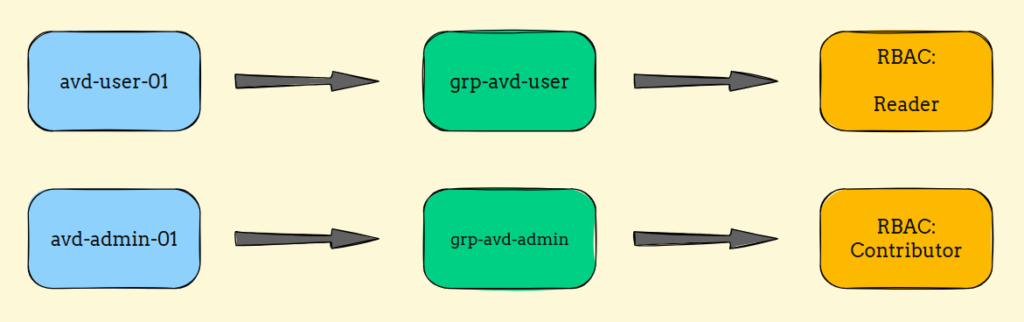
The test I was going to perform is, login to Azure portal using both user and admin. Test the capabilities of both as they had different RBAC roles assigned to them.
When I tried to login to Azure portal using either of users, surprisingly, I was asked to configure MFA even though I didn’t touch conditional access configurations.
I learned that Azure enforces the baseline security policy by default to the new tenants to keep the identity secure, whether you plan for them or not.
What’s next in week-02?
In Week 2, I move on to building a cloud-only Azure Virtual Desktop environment — and that’s where a few long-held assumptions around identity and authentication were challenged.
What looked straightforward on paper turned into a valuable learning exercise once I actually got my hands dirty. See you on week-2!